

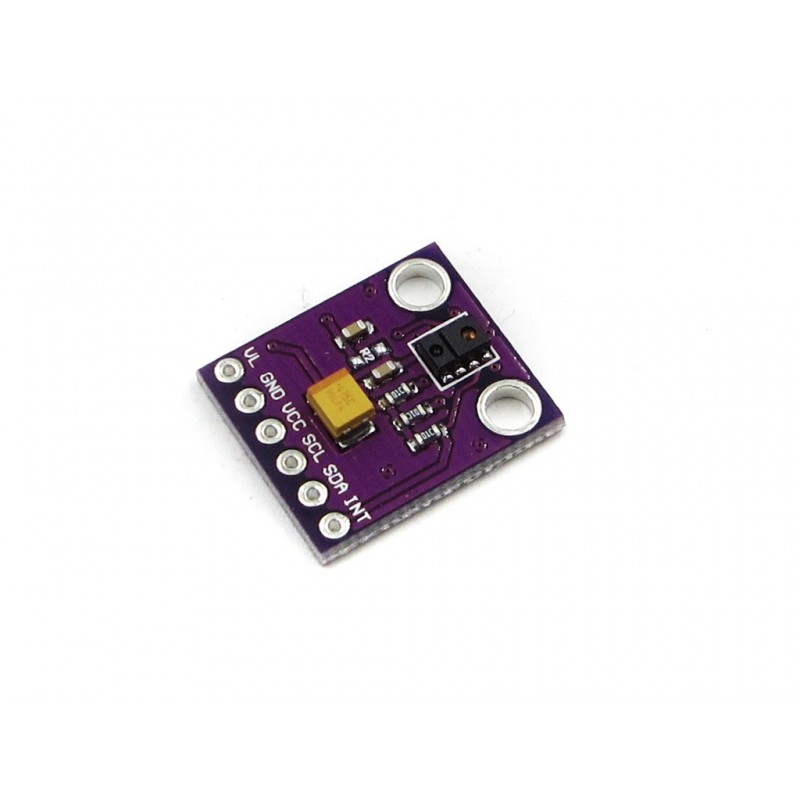

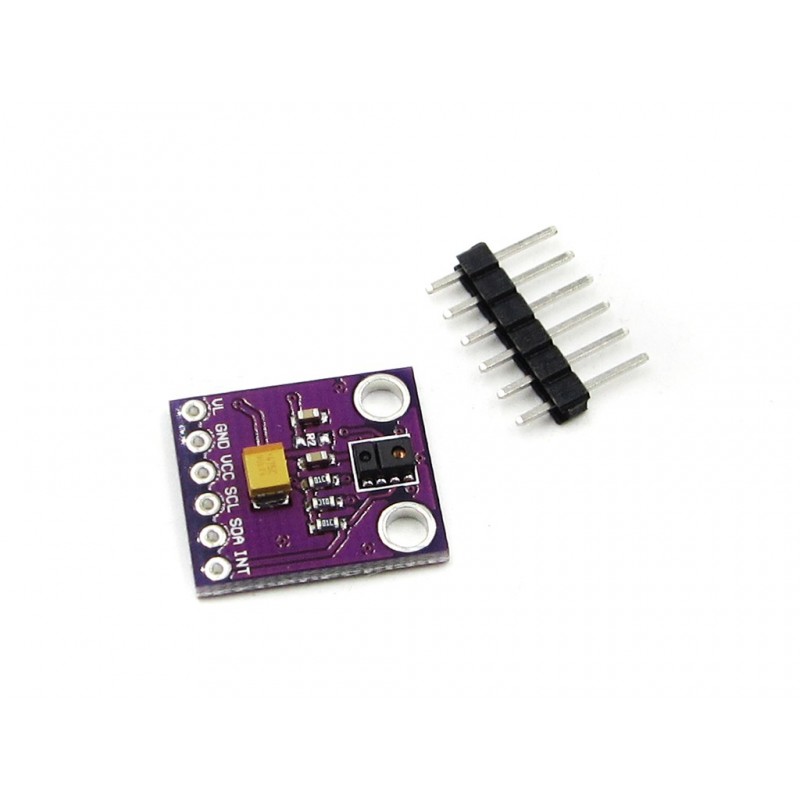


Cjmcu 9900 Apds9900 Digital Ambient Light Proximity Sensor Module
Rs. 70.00 Rs. 84.00
- Brand: https://www.broadcom.com/products/optical-sensors/integrated-amb
- Product Code: SEN-AMBIENT
- Availability: 2-3 Days
- Price in reward points: 2
- For Bulk Order
 9962060070
| SPECIFICATIONS: | |
| Lifecycle | Active |
| Distrib. Inventory | Yes |
| ALS Output | Digital I2C |
| PS Output | Digital I2C |
| Supply Voltage (V) | 2.5 – 3.6 |
OVERVIEW:
-Operational Voltage: 3.3V
-Ambient Light & RGB Color Sensing
-Proximity Sensing
-Gesture Detection
-Operating Range: 4-8in (10-20cm)
-I2C Interface (I2C Address: 0x39)
PACKAGE INCLUDES:
1 PCS x Cjmcu 9900 Apds9900 Digital Ambient Light Proximity Sensor Module
https://www.broadcom.com/products/optical-sensors/integrated-ambient-light-proximity-sensors/apds-9900
/* SOURCE CODE TAKEN FROM BELOW LINK
https://learn.sparkfun.com/tutorials/apds-9960-rgb-and-gesture-sensor-hookup-guide/all
****************************************************************
AmbientLightInterrupt.ino
APDS-9960 RGB and Gesture Sensor
Shawn Hymel @ SparkFun Electronics
October 24, 2014
https://github.com/sparkfun/APDS-9960_RGB_and_Gesture_Sensor
Tests the ambient light interrupt abilities of the APDS-9960.
Configures the APDS-9960 over I2C and waits for an external
interrupt based on high or low light conditions. Try covering
the sensor with your hand or bringing the sensor close to a
bright light source. You might need to adjust the LIGHT_INT_HIGH
and LIGHT_INT_LOW values to get the interrupt to work correctly.
Hardware Connections:
IMPORTANT: The APDS-9960 can only accept 3.3V!
Arduino Pin APDS-9960 Board Function
3.3V VCC Power
GND GND Ground
A4 SDA I2C Data
A5 SCL I2C Clock
2 INT Interrupt
13 - LED
Resources:
Include Wire.h and SparkFun_APDS-9960.h
Development environment specifics:
Written in Arduino 1.0.5
Tested with SparkFun Arduino Pro Mini 3.3V
This code is beerware; if you see me (or any other SparkFun
employee) at the local, and you've found our code helpful, please
buy us a round!
Distributed as-is; no warranty is given.
****************************************************************/
#include <Wire.h>
#include <SparkFun_APDS9960.h>
// Pins
#define APDS9960_INT 2 // Needs to be an interrupt pin
#define LED_PIN 13 // LED for showing interrupt
// Constants
#define LIGHT_INT_HIGH 1000 // High light level for interrupt
#define LIGHT_INT_LOW 10 // Low light level for interrupt
// Global variables
SparkFun_APDS9960 apds = SparkFun_APDS9960();
uint16_t ambient_light = 0;
uint16_t red_light = 0;
uint16_t green_light = 0;
uint16_t blue_light = 0;
int isr_flag = 0;
uint16_t threshold = 0;
void setup() {
// Set LED as output
pinMode(LED_PIN, OUTPUT);
pinMode(APDS9960_INT, INPUT);
// Initialize Serial port
Serial.begin(9600);
Serial.println();
Serial.println(F("-------------------------------------"));
Serial.println(F("SparkFun APDS-9960 - Light Interrupts"));
Serial.println(F("-------------------------------------"));
// Initialize interrupt service routine
attachInterrupt(0, interruptRoutine, FALLING);
// Initialize APDS-9960 (configure I2C and initial values)
if ( apds.init() ) {
Serial.println(F("APDS-9960 initialization complete"));
} else {
Serial.println(F("Something went wrong during APDS-9960 init!"));
}
// Set high and low interrupt thresholds
if ( !apds.setLightIntLowThreshold(LIGHT_INT_LOW) ) {
Serial.println(F("Error writing low threshold"));
}
if ( !apds.setLightIntHighThreshold(LIGHT_INT_HIGH) ) {
Serial.println(F("Error writing high threshold"));
}
// Start running the APDS-9960 light sensor (no interrupts)
if ( apds.enableLightSensor(false) ) {
Serial.println(F("Light sensor is now running"));
} else {
Serial.println(F("Something went wrong during light sensor init!"));
}
// Read high and low interrupt thresholds
if ( !apds.getLightIntLowThreshold(threshold) ) {
Serial.println(F("Error reading low threshold"));
} else {
Serial.print(F("Low Threshold: "));
Serial.println(threshold);
}
if ( !apds.getLightIntHighThreshold(threshold) ) {
Serial.println(F("Error reading high threshold"));
} else {
Serial.print(F("High Threshold: "));
Serial.println(threshold);
}
// Enable interrupts
if ( !apds.setAmbientLightIntEnable(1) ) {
Serial.println(F("Error enabling interrupts"));
}
// Wait for initialization and calibration to finish
delay(500);
}
void loop() {
// If interrupt occurs, print out the light levels
if ( isr_flag == 1 ) {
// Read the light levels (ambient, red, green, blue) and print
if ( !apds.readAmbientLight(ambient_light) ||
!apds.readRedLight(red_light) ||
!apds.readGreenLight(green_light) ||
!apds.readBlueLight(blue_light) ) {
Serial.println("Error reading light values");
} else {
Serial.print("Interrupt! Ambient: ");
Serial.print(ambient_light);
Serial.print(" R: ");
Serial.print(red_light);
Serial.print(" G: ");
Serial.print(green_light);
Serial.print(" B: ");
Serial.println(blue_light);
}
// Turn on LED for a half a second
digitalWrite(LED_PIN, HIGH);
delay(500);
digitalWrite(LED_PIN, LOW);
// Reset flag and clear APDS-9960 interrupt (IMPORTANT!)
isr_flag = 0;
if ( !apds.clearAmbientLightInt() ) {
Serial.println("Error clearing interrupt");
}
}
}
void interruptRoutine() {
isr_flag = 1;
}
15 days